
The Science Behind The Diets
All diets that ever existed have the same thing in common — they set you up to consume fewer calories than your body spends. They package the core science behind it in a few simple-to-follow rules (foods you can and can't eat) to help you avoid tracking calories, but the energy equation that makes you lose weight stays the same.
It's the first law of thermodynamics applied to your body: energy cannot be created or destroyed, it can only be transferred. When you eat or drink, your body extracts the energy through digestion and metabolic processes. That energy is then used for breathing, blood circulation, brain function — all the things your body does to stay alive. It also powers any additional activity you choose to do, from fidgeting to running a marathon.
The basic rule is simple: if you consume more energy than your body needs, the excess is stored as body fat. If you consume less than it requires, your body has to make up the difference by using its stored reserves — mainly fat, though sometimes muscle as well.
That is how you lose weight.
Why Track Calories?
If the science behind weight loss is well understood, why don't more people track their calories, maintain a deficit, and lose weight when they want to?
The reason is simple: calorie tracking has an image problem. It sounds complicated, tedious, and time-consuming. And to be fair, that reputation was once deserved, which is why so many diet systems were invented to avoid it in the first place.
But that's not true anymore. In this article, I will show you how even a lazy person like me can track calories effortlessly with modern technology, a few simple tricks and barely any friction.
Before we get to that, you might have one more question — even if calories in, calories out is the scientific basis behind all the diets, and modern calorie tracking can be effortless, why choose it over another established diet program?
The biggest advantage of calorie tracking is that it doesn't restrict what foods you can eat! It gives you a daily and weekly calorie budget, but you have complete freedom to spend it however you like. If one day you fancy a cheesecake, you can have it without any guilt, as long as you make room in your budget.
While writing the paragraph above, I considered which cake to use as an example and decided on cheesecake because I know it's one of the most calorie-dense. I didn't google that! It's the second big advantage of calorie tracking. Once you start tracking all the calories you consume, you will get a good understanding of where they are hidden in your food (and drinks).
And that knowledge outlasts any diet. A common criticism of diet programs is that people regain the weight once they stop, and often more than they lost. The reason is that following a set of food rules doesn't teach you anything about the food itself. Calorie tracking is different. The knowledge you gain — which foods are calorie-dense, which aren't — stays with you and quietly reshapes how you eat, even if you stop actively tracking.
How I Got Here
I first started tracking calories in 2009 after reading The Hacker's Diet. The book made me realise that losing weight isn't rocket science — the body's energy system is straightforward. All I need to do is track the calories I consume and weigh myself regularly.
I went on to lose 20 kg (44 pounds or 3.15 stones) in about 5 months by restricting how much I eat (based on the calorie budget I've set for myself) and going to the gym several times a week to increase the number of calories I burn.
I'll be honest, that rate of weight loss isn't healthy. I was overexcited that I was finally in control, and I was pushing my body perhaps a bit too hard. The only reason why I share that exact number is to show that calorie tracking is very effective — you follow the rules, you get the result.
Many years have passed since then. My weight stabilised in the middle between that extreme weight loss and the original overweight state I hated. I do casual, lazy calorie tracking now, with the only goal of making the weight trend down, but I don't mind how quickly it goes there.
Direction — important, speed — don't care.
Overview Of My Tracking Stack
Over the years, I've naturally optimised my setup to make calorie tracking as easy as possible — something I can sustain as a lifelong habit.
Here's what I use.
- Apple iPhone with Apple Health — this is the central hub where the data from all the devices and apps is collected
- Apple Watch — to track the calories that I burn
- Lose It! app — to track the calories that I consume
- Withings WiFi scales — to track my weight progress and automatically sync it to Apple Health
- Amazon Basics kitchen scales — to weigh the food and drinks
- ChatGPT — to estimate approximate calories from meal photos
Setting Up: Lose It And Your Budget
Lose It! is at the core of my calorie tracking stack.
I connect it to Apple Health and Apple Watch, giving it all the requested permissions. Through that integration, it knows my age, height, weight, how many calories I've burned today passively (resting energy) and actively (active energy).
I then configure the budget, setting the activity level to the minimum (Not Active), so all burned calories come from Apple Watch tracking.
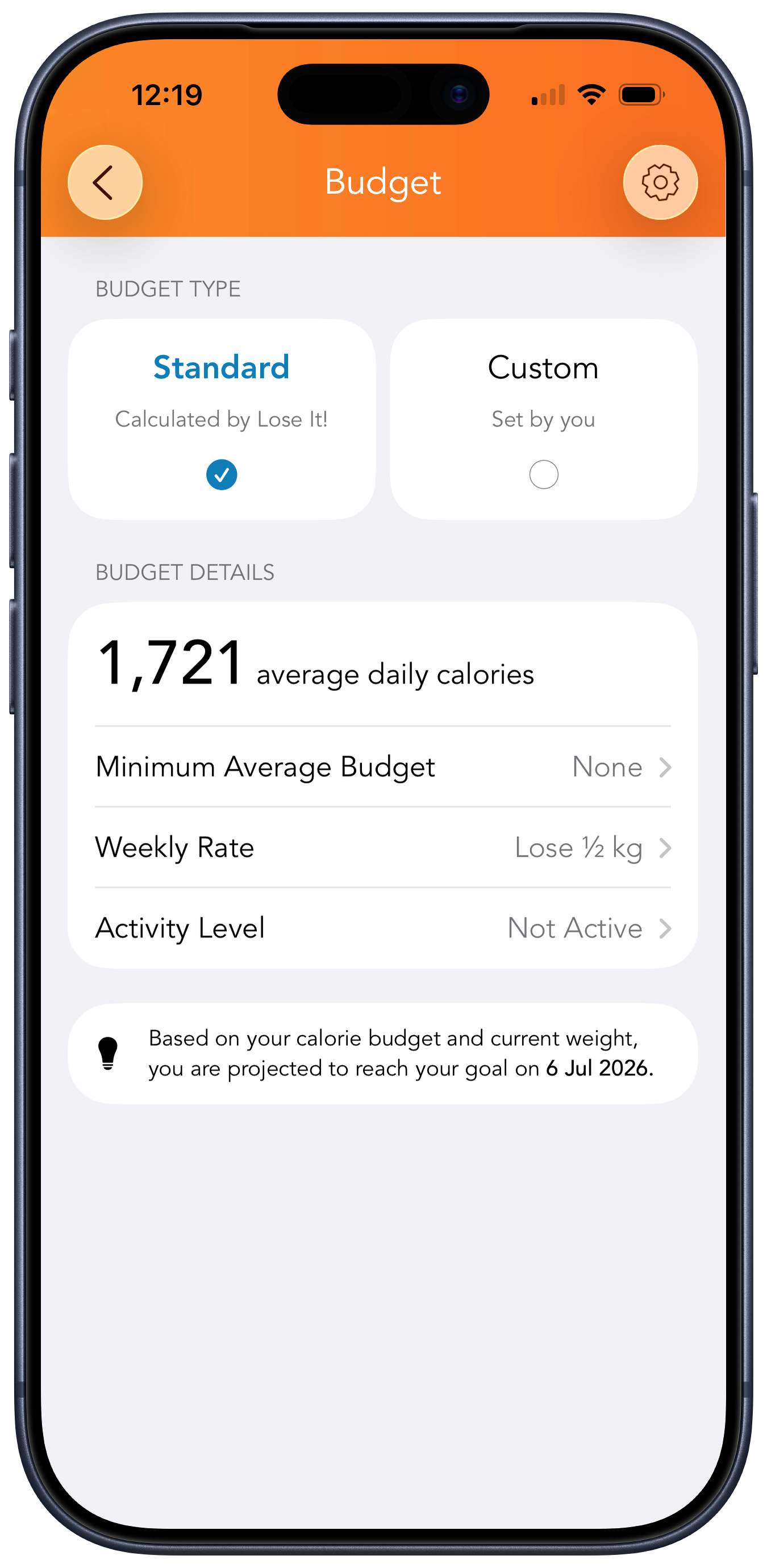
I prefer to use the middle weekly rate in the budget (Lose 1/2 kg), but it's a personal preference. The main thing to note when choosing the weekly rate is the calories for the Maintain level and how much higher that number is than the budget that you've chosen (more on that later).
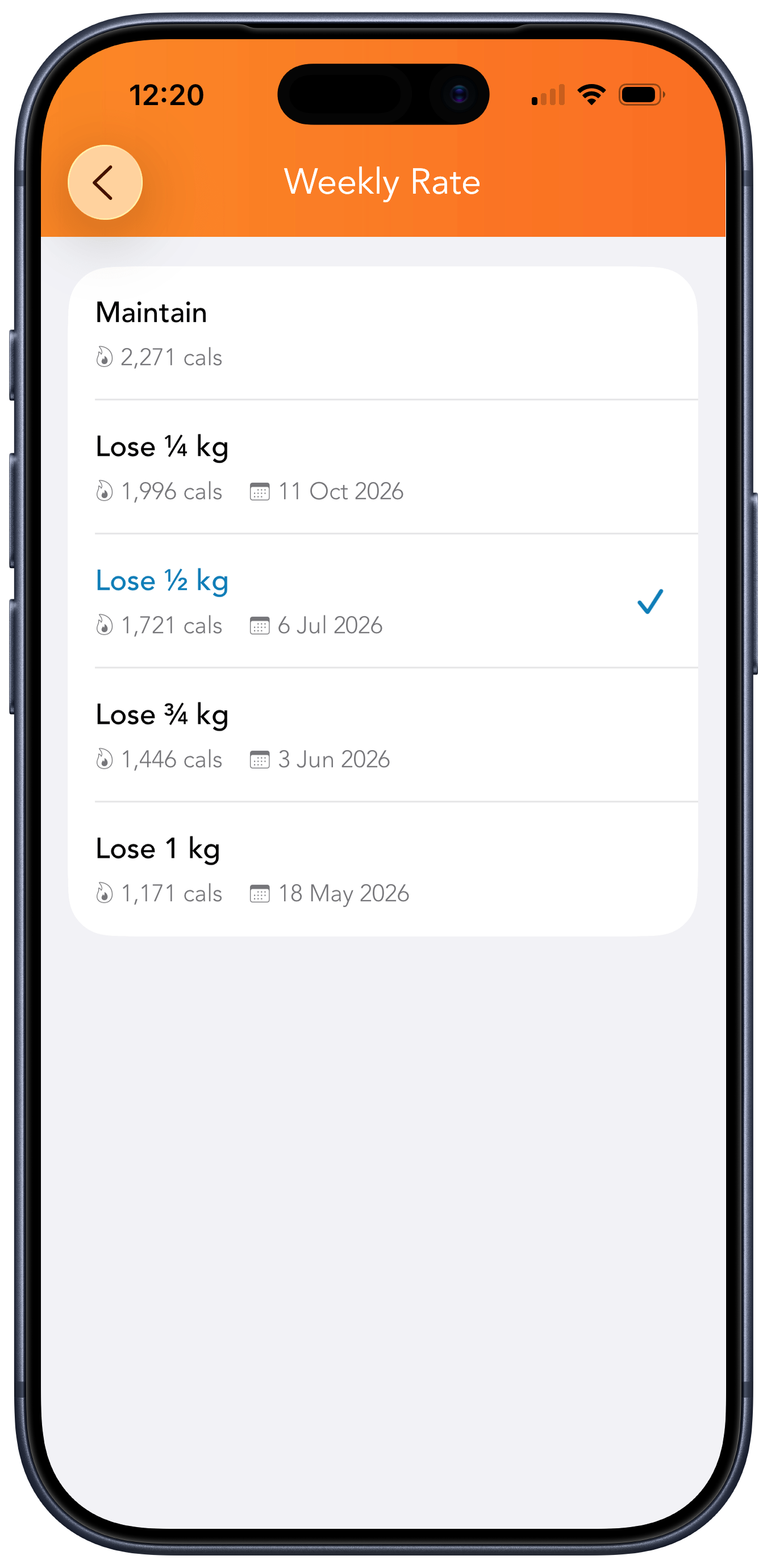
The important thing about the budget is that it's not a fixed amount of calories per day. The budget base value slowly changes from day to day as your weight fluctuates. And on days when you are active and spend more calories than usual, the budget will automatically expand to give you extra calories to consume.
Weighing Yourself: Withings Scales
Withings scales are great for a hands-off approach to weight tracking. Connect them to your wifi. Install their app on your phone and permit it to write data to Apple Health, and it's all done. Every time you step on the scales, it will automatically sync to Apple Health, and all the apps that use that data (like Lose It) will automatically have your up-to-date weight every day.
It's important to weigh yourself in similar conditions every time — the usual advice is to do it after the bathroom in the morning. That's what I do myself. And I do it daily.
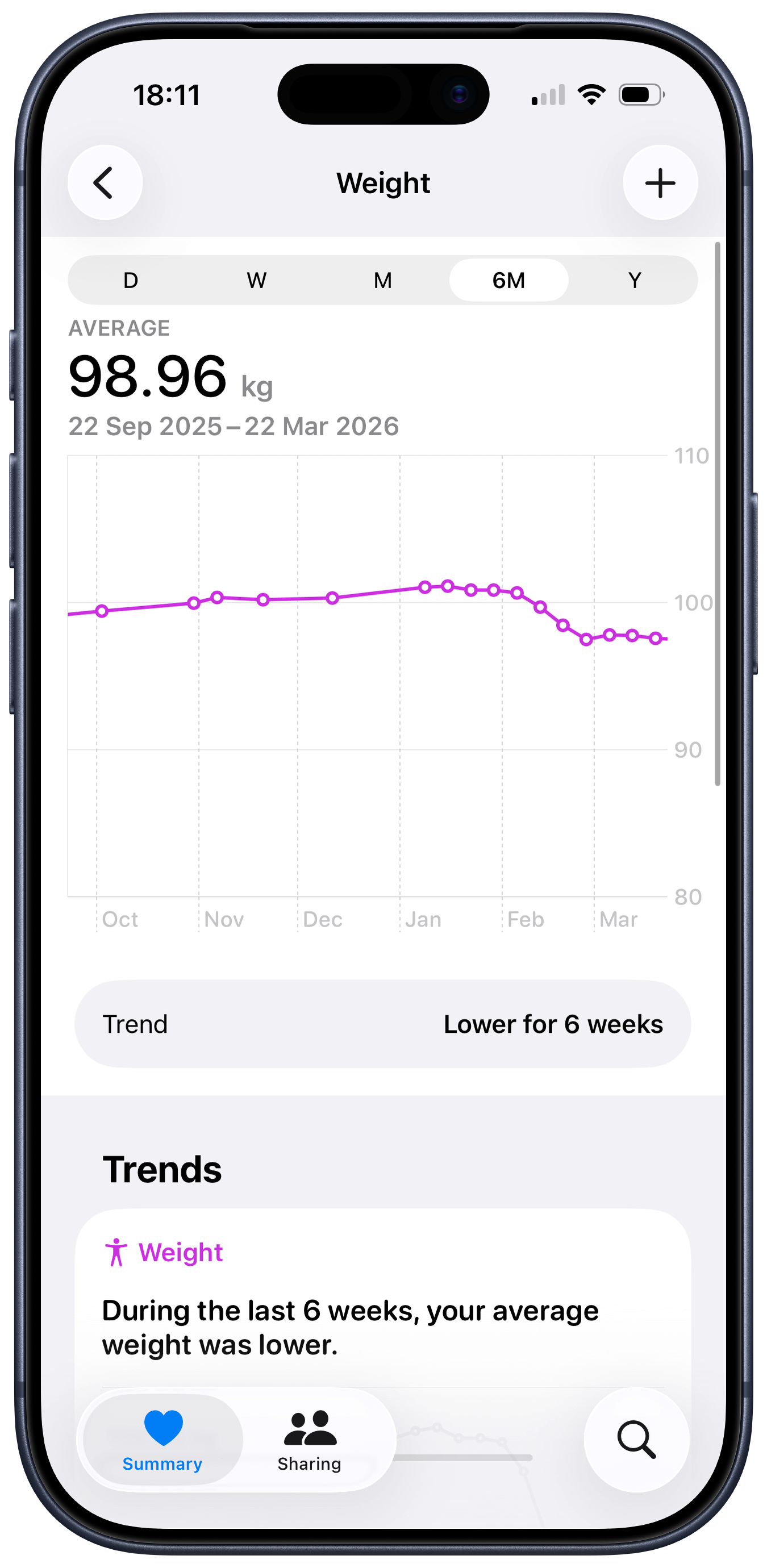
You'll often hear that weighing yourself daily is bad because daily weights can fluctuate a lot (due to the body retaining or releasing extra water). But I'd advise doing it daily, then checking the weight trends in Apple Health (or Withings app). The daily weight number isn't important, but the trend built from the daily measurements is — it shows you which way your weight is going and how fast.
If you weigh yourself once a week, you're as likely to land on a fluctuation — except now you have no trend to tell you it was one.
Energy Burned: Apple Watch
The Hacker's Diet introduced the concept of an Eat Watch. You'd set it to your goal weight, and it would then tell you when you can eat and when you need to stop.
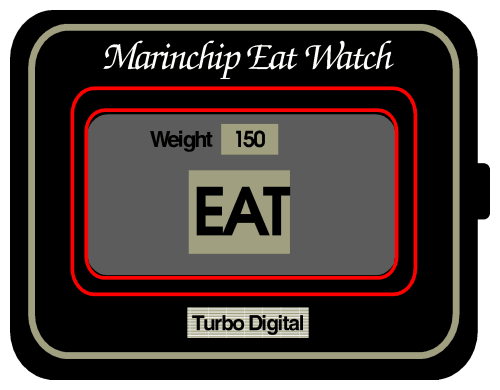
It's remarkable how close Apple Watch has come to that concept. It tracks your movement and heart rate and, based on that, can estimate how many calories you are burning. Add to that tracking of calories you consume through Lose It, and you have all the information to guide you on how much food you can still eat today, or whether you need to increase your activity to meet your daily budget.
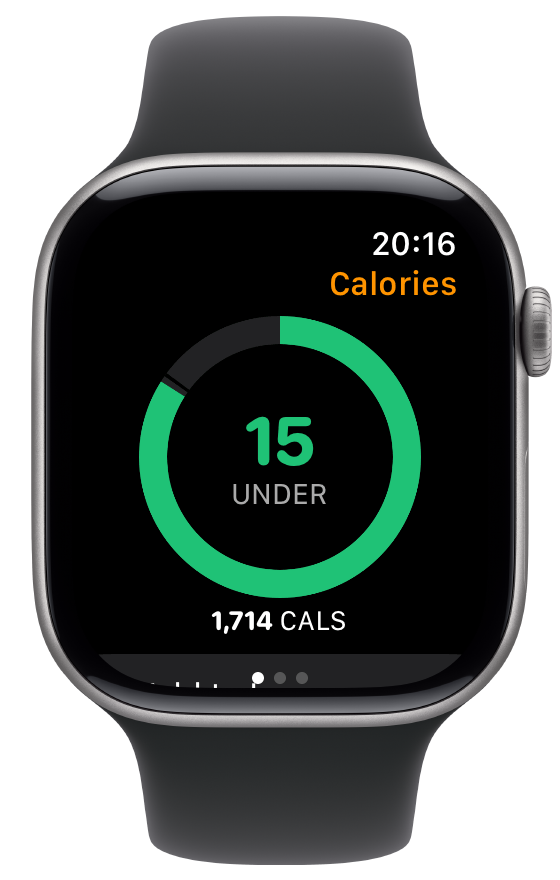
When you use Apple Watch as part of your calorie tracking stack, it's responsible for adding all burned calories to Apple Health. That means both resting energy calories (burned by your body on simply functioning) and active energy calories (extra movement and exercise you could be doing).
You can't do much about resting calories. They rise or fall gradually as you gain or lose weight. But active calories are different — you can influence those directly, and that's where things get interesting.
It's what makes the whole thing motivating for me. Activity stops feeling abstract and starts feeling useful. It becomes one of the tools you can reach for to make that cheesecake fit the budget: eat it, log it in Lose It, then plan an hour-long walk later.
Logging What You Eat
That's the most important part and where friction can happen. Over time, I've developed several approaches to make everything quick and easy.
Barcode Scanner
The barcode scanner in Lose It is the best way to quickly add foods and drinks. The app has a good database — most of the foods and drinks you can buy in a store are already in it. You point the camera at the barcode. It takes a moment to match the food in the database. You then enter the quantity you've consumed and save.
The whole process takes several seconds from start to finish. At this point, I'm doing it without looking — I point the scanner's camera at the barcode on the food's package, wait for the haptic feedback indicating a match, and I'm done.
Frequent Foods
The next best method, which may be quicker than the barcode scanner, is a list of frequent foods.
As the name implies, it's useful when you are entering the same foods day after day. By default, Lose It would filter frequent foods to the same meal type.
For example, if you eat the same yoghurt for breakfast, you will see it at the top of the suggested entries when adding breakfast foods, but not when adding dinner foods.
Copy Foods From Previous Meal
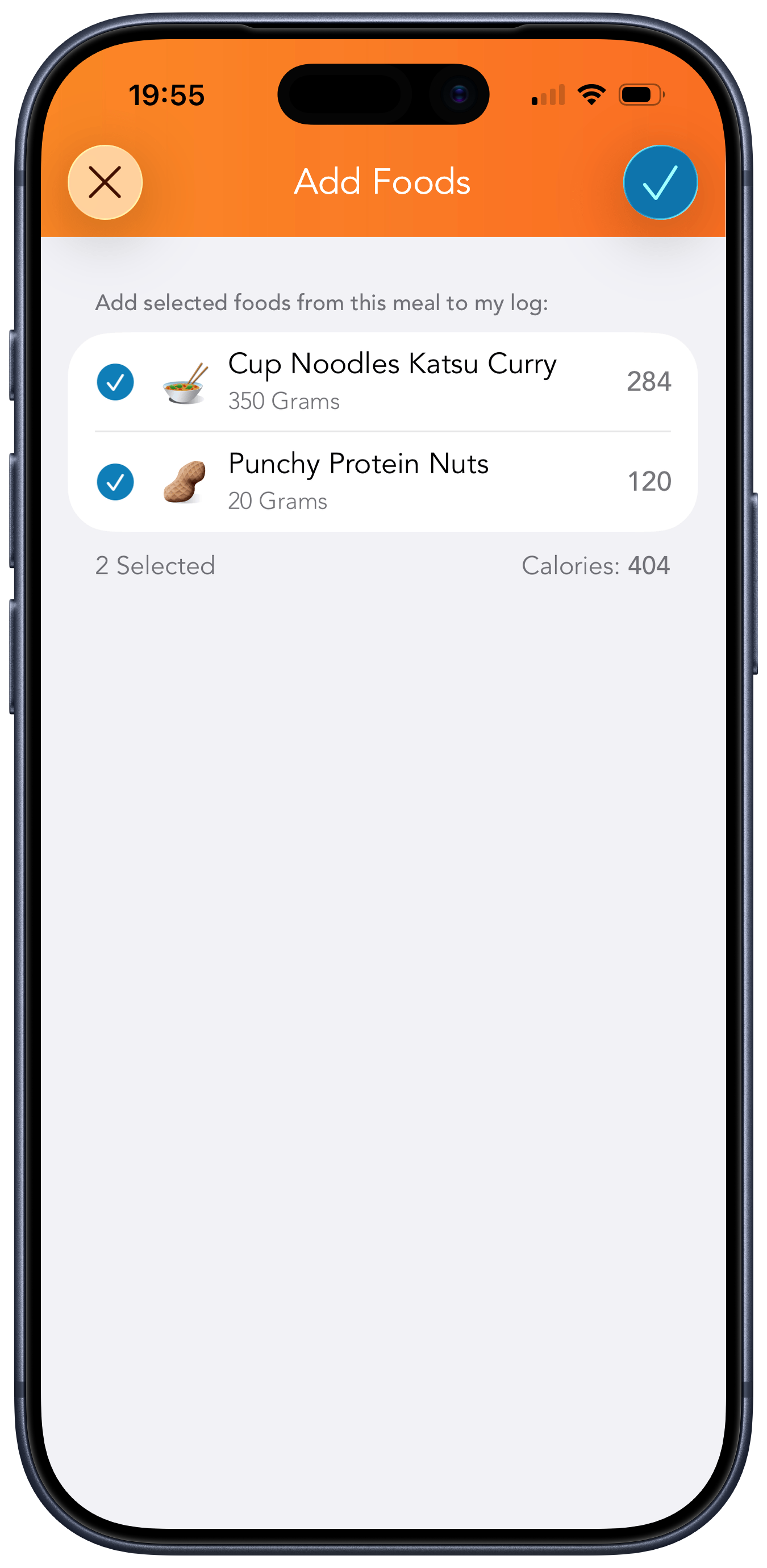
Another hidden feature I use a lot is copying foods from a previous meal. It's useful when you cook enough for several days and spend time logging it properly the first time. On subsequent days, you don't have to redo that work — you can copy it.
Go to the day when you had the meal. Tap ... next to the meal, select View Meal Summary and then, finally, tap Log Meal Today.
Kitchen Scales
Kitchen digital scales are essential for tracking calories. I use them at least a dozen times every day.
There are two features worth looking for in kitchen scales: a tare function and negative weight.
The tare function is needed to measure the weight of components you add to a plate or a cup. Add a plate to the scales, press the tare button; the weight resets to 0. Add the first component, log its weight (or take a photo of the scales — more on that below), press the tare button again, add the next component, rinse and repeat.
The negative weight is useful for the opposite scenario: measuring how much you've consumed. For example, you can put a bottle of juice on the scales, press the tare button to set the weight to 0, drink from it as much as you want, then put it back on the scales. If your scales support negative weight, at that point you'll see how much juice you've consumed as a negative number. Ignore the minus sign and log the number.
Snap Now, Log Later
The camera on your phone is the escape hatch you can use when you don't have time to log something, or when it takes extra time to figure out how many calories to log.
It's perfect for eating out at places that don't specify calories for meals (a lot of them do now!). Snap a photo of a meal and deal with logging it later, when you have time.
ChatGPT
AI is another escape hatch that pairs well with the phone camera. Give ChatGPT a photo of a meal along with a brief description, and it will return the approximate calories.
Indeed, the calories you'll get this way would be an estimate. You might think this is not accurate enough for calorie tracking, but you will be surprised to learn that all calorie tracking is approximate.
Why Approximate Is Good Enough
Calorie tracking is inherently imprecise. Food labels could be off by as much as 20%. Restaurants can't prepare the meals the same way every time. Apple Watch tracking relies on estimates based on limited sensor data.
Calorie tracking still works because it doesn't need to be perfectly accurate — it just needs to be accurate enough to show the trend. Your body is noisy anyway: weight fluctuates from day to day because of water, digestion, hormones, and other factors, so the goal is not precision to the last calorie, but a signal good enough to guide your decisions.
If your food logging is a bit off, but it is off in a similar way most days, it still gives you a workable signal. Same with calorie burn estimates. You are using rough instruments, but rough instruments can still tell you whether you are overeating, maintaining, or undereating.
Inaccurate tracking can work well, as long as it is consistently inaccurate and you keep correcting based on results.
Relaxed Calorie Tracking
Since the system is imprecise, using a unit longer than a day for tracking makes sense. If you tap the date at the top in Lose It, it will open a view that shows your weekly progress: how many calories you are under or over budget for each previous week.
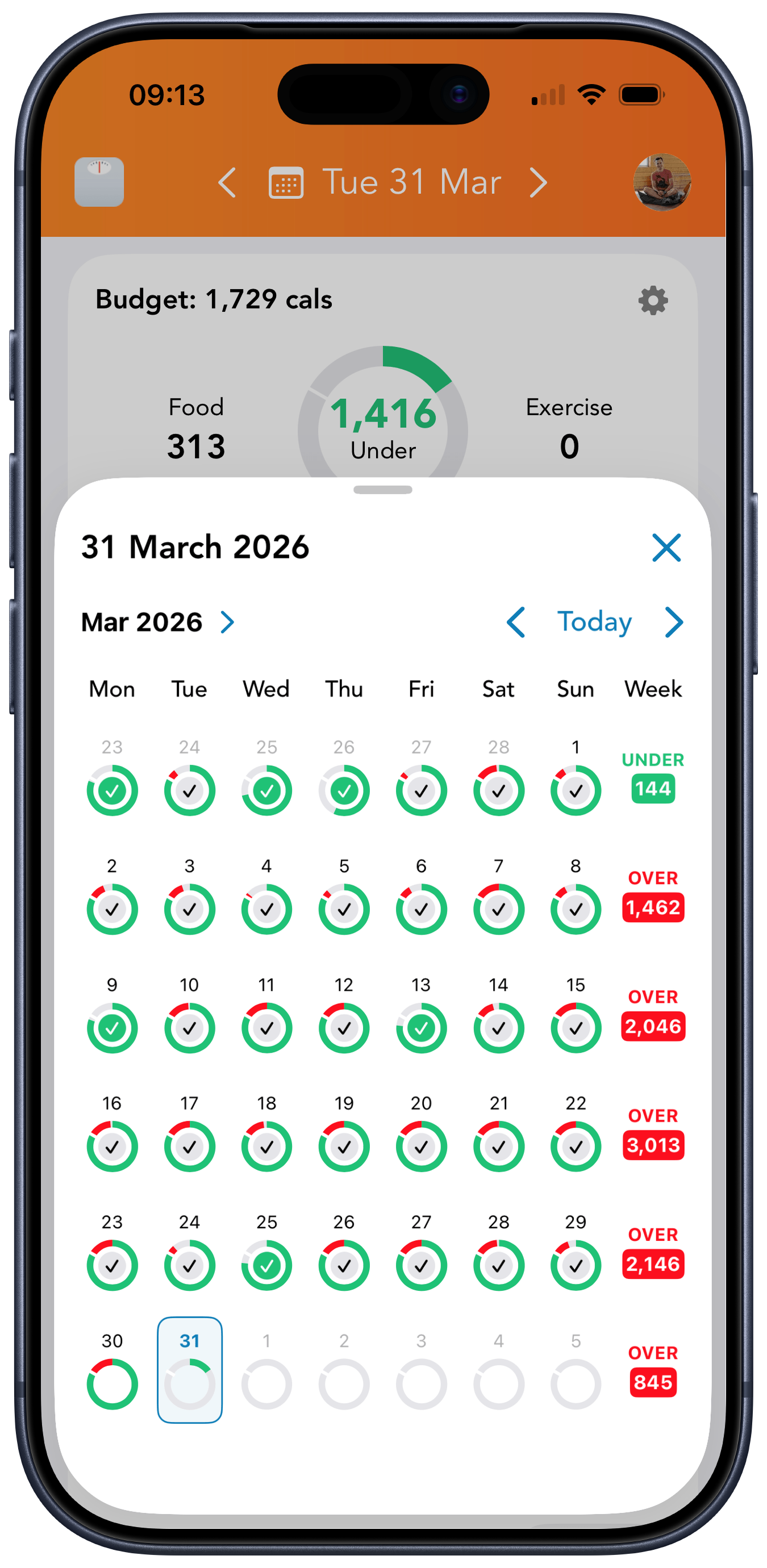
That's the first relaxation point. I aim to stay under the budget each day, as that would give me the weight-loss speed I want, but I don't stress when I go over it on some days. In that case, I shift my focus to staying under the weekly budget. This keeps the system flexible.
The second relaxation point is to allow myself to go even further with the budget, beyond the daily and weekly limits, while staying under the maintenance level (remember the Maintain budget I mentioned earlier in the Lose It setup section?). The rate of weight loss suffers from this, but as long as I stay consistently under the maintenance level, I am slowly losing weight, and that's all I care about.
Finally, even on days when I go well beyond maintenance due to external circumstances, such as a party or a holiday, I don't stop logging. The temptation is to write the day off, but I've discovered that if I keep track of what I eat, I'll naturally limit myself. Knowing that I'm over the budget has a way of making me choose smaller portions and stop sooner than I would have otherwise.
Keep It Healthy
One criticism of calorie tracking is that it can become obsessive for some people. I can't speak for others, but for me personally, even though I've been calorie-tracking on and off for more than 15 years, I don't think there is anything compulsive about it.
I've settled into a relaxed, lazy routine that works well for me. It's easy, and I do it automatically. I have a goal in Lose It that I'm slowly approaching. From time to time, I think about what I'd do if I reached it one day — most likely, I'd continue tracking calories, but I would switch the goal to maintenance, relaxing the system even more.
It's easy to overdo calorie tracking at first because you are too excited to be in control of your weight, finally. I think that's fine, and I can understand those emotions, as I have experienced them myself. As long as you switch to a sustainable pace after the "honeymoon" period, you'll be okay.
Good luck!